
OpenCode
OpenCode supports the same ACT concepts as Claude Code, but the normal skill entrypoint is the /skills UI rather than direct slash-command invocation for every workflow.
Install
Section titled “Install”cd ~/.agentic-coding-toolkit && ./scripts/install.sh --tool opencodeWhat Gets Installed
Section titled “What Gets Installed”| Location | Includes |
|---|---|
~/.config/opencode/skills/ | Symlinked canonical ACT skill directories used by /skills |
~/.config/opencode/plugins/ | Symlinked ACT hooks plugin |
~/.config/agentic-coding-toolkit/ | Shared ACT settings and copied runtime helper |
Verify
Section titled “Verify”Start a new OpenCode session from the same environment where you installed ACT, then open /skills and confirm that ACT’s act-* skills are available there. Run act-help from the skills list to verify the ACT help navigator.
Skills
Section titled “Skills”OpenCode uses the same installed act-* skills, but the normal entrypoint is /skills:
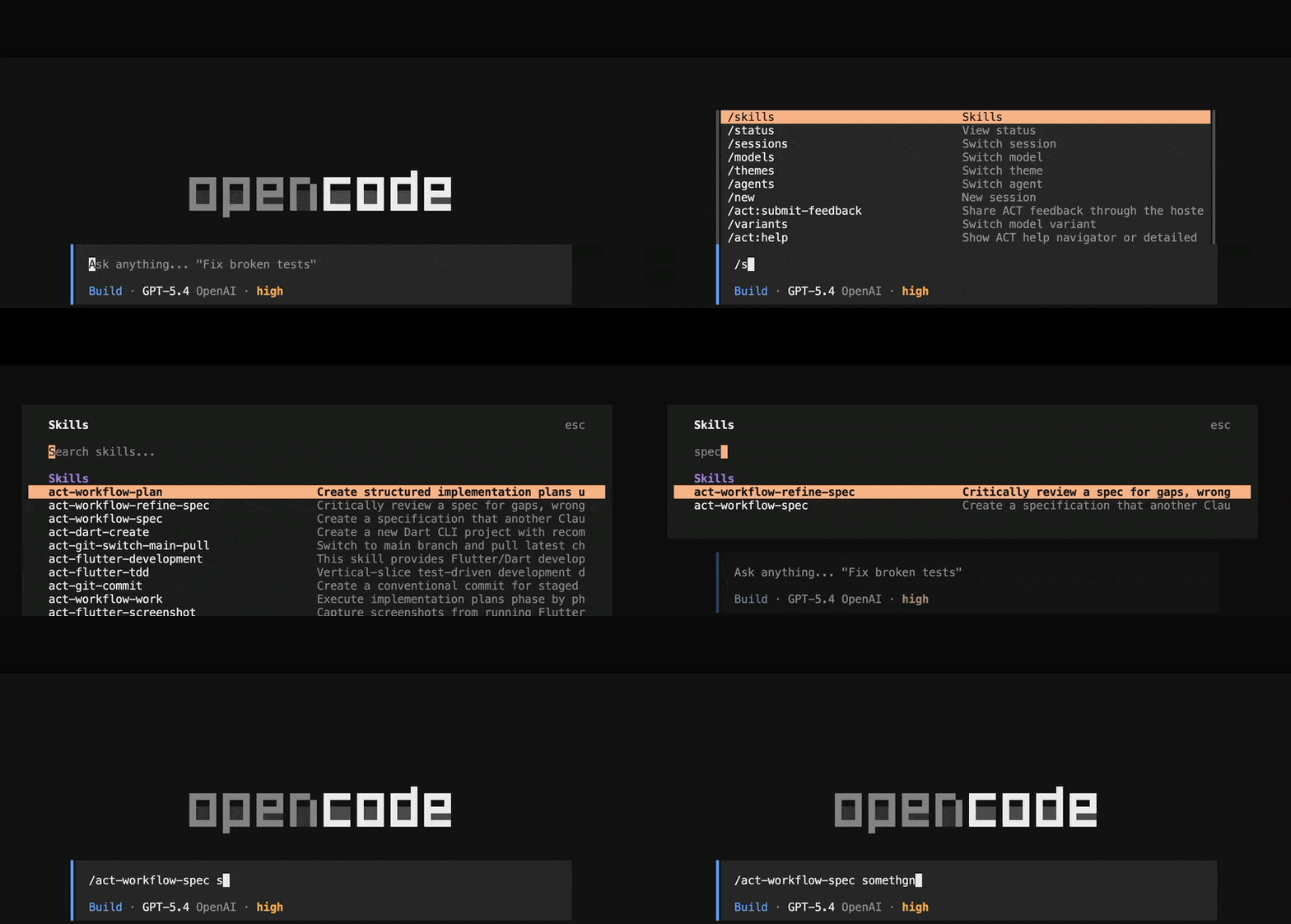
Use /skills to:
- browse available ACT skills
- select the matching
act-*skill - run it with the right arguments
The underlying skill names stay the same as the rest of the docs, such as act-create-issues, act-implement, and act-git-push-make-pr.
If you also install ACT for Codex, Codex-generated skill copies live under ~/.codex/skills, not ~/.agents/skills, so OpenCode keeps using its native ACT skills under ~/.config/opencode/skills.
ACT installs an OpenCode plugin under the OpenCode config directory. The plugin covers ACT’s hook-style behavior, but statusline parity is intentionally out of scope.
Permissions
Section titled “Permissions”For the strategy comparison, see Permissions & Safety.
Strategy 1: Permission rules
Section titled “Strategy 1: Permission rules”OpenCode supports file-based permission configuration through opencode.json at the project level, or ~/.config/opencode/opencode.json at the user level.
For a typical ACT setup, add permissions like this:
{ "$schema": "https://opencode.ai/config.json", "permission": { "bash": { "git *": "allow", "flutter *": "allow", "dart *": "allow", "node *": "allow", "gh *": "allow" }, "read": "allow", "edit": { "*": "allow", "~/.pub-cache/**": "deny" }, "glob": "allow", "grep": "allow", "external_directory": { "~/.pub-cache/**": "allow" } }}For Flutter projects, this grants read-only access to ~/.pub-cache, which many apps need for dependency resolution and tooling.
Strategy 2: DSP / yolo + non-sudo account
Section titled “Strategy 2: DSP / yolo + non-sudo account”OpenCode supports YOLO mode through --dangerously-skip-permissions:
opencode --dangerously-skip-permissionsYou can also enable it with an environment variable:
OPENCODE_DANGEROUSLY_SKIP_PERMISSIONS=true opencodeFor one-shot runs:
opencode run --dangerously-skip-permissions "do something"Use YOLO mode only from a dedicated non-sudo account or another isolation boundary. OpenCode’s YOLO mode is documented upstream in opencode issue #8463.
Remote machines and containers
Section titled “Remote machines and containers”You can run OpenCode on a VPS or remote dev machine and use the same permission strategy there. Treat the remote host as the isolation boundary.
OpenCode can also run with permission rules or YOLO mode inside a container when you want stronger isolation. See Permissions & Safety for the full VPS and Docker tradeoffs.
Troubleshooting
Section titled “Troubleshooting”- Selecting
Always Allowcan be session-scoped; persist common ACT permissions inopencode.json. - If project and user configs conflict, inspect the project
opencode.jsonfirst. - If Flutter dependency reads fail, check
external_directoryaccess for~/.pub-cache/**.