
Cursor
ACT on Cursor ships as a local plugin that exposes ACT skills.
Install
Section titled “Install”cd ~/.agentic-coding-toolkit && ./scripts/install.sh --tool cursorWhat Gets Installed
Section titled “What Gets Installed”| Location | Includes |
|---|---|
~/.cursor/plugins/local/ | Symlinked ACT local plugin directory |
~/.config/agentic-coding-toolkit/ | Shared ACT settings and copied runtime helper |
Verify
Section titled “Verify”After installing or updating ACT for Cursor:
- Restart or reload Cursor
- Open Agent chat
- Type
/act-
You should see ACT’s available act-* skills.
Skills
Section titled “Skills”Invoke ACT skills from Agent chat using the same canonical names documented across the site, for example:
/act-create-issues ai_specs/0001-settings/spec.md/act-implement ai_specs/0001-settings/work-items/01-settings-screen.mdACT hooks are not currently supported on Cursor.
Permissions
Section titled “Permissions”For the strategy comparison, see Permissions & Safety.
Strategy 1: Permission rules
Section titled “Strategy 1: Permission rules”Cursor supports permission rules through permissions.json and Run Mode settings.
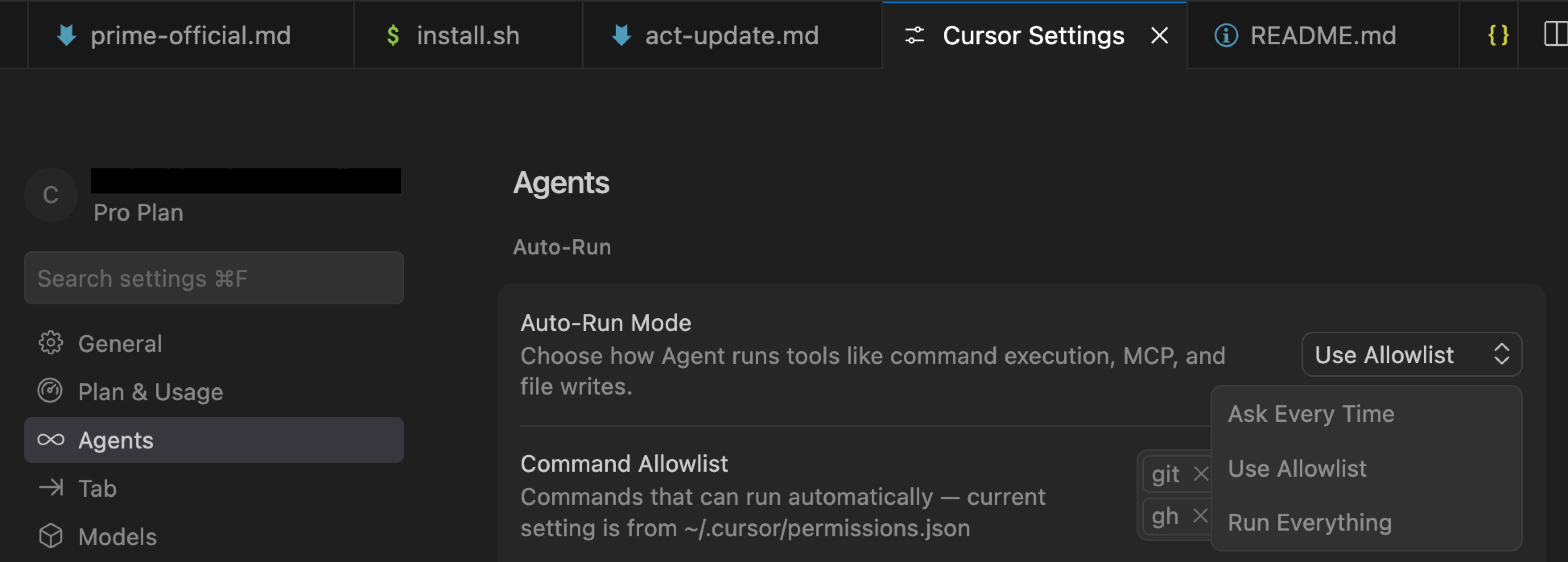
Use Allowlist when you want predictable terminal and MCP allowlists for ACT. Use Auto-review when you want Cursor’s classifier to decide whether matching tool calls can run, optionally guided by autoRun instructions.
permissions.json can be configured globally or per workspace:
~/.cursor/permissions.json<workspace>/.cursor/permissions.json
When both files exist, Cursor concatenates arrays from both files. When permissions.json defines an allowlist, it overrides the corresponding in-app allowlist for that allowlist type.
For ACT, the useful minimum is:
{ "terminalAllowlist": [ "git", "flutter", "dart", "node", "gh" ]}Cursor also supports mcpAllowlist for MCP tools:
{ "mcpAllowlist": [ "github:*", "linear:list_issues" ]}In Auto-review mode, Cursor also supports autoRun instructions for classifier guidance:
{ "autoRun": { "allow_instructions": [ "Allow read-only inspection commands for project files and build outputs." ], "block_instructions": [ "Ask before deleting files, changing shell configuration, or touching credentials." ] }}autoRun steers Cursor’s classifier; it is not an enforcement boundary.
To make allowlists effective, enable a Cursor Run Mode such as Allowlist or Auto-review in Cursor Settings:
DSP / yolo equivalent
Section titled “DSP / yolo equivalent”Cursor does not call its bypass mode DSP/yolo. Its closest equivalent is Run Everything, which skips Cursor’s safety checks. Treat it with the same isolation principle as DSP / yolo mode: prefer a non-sensitive account, remote dev machine, or containerized environment when appropriate.
Remote machines and containers
Section titled “Remote machines and containers”You can run Cursor against a remote workspace or isolated environment where that fits your workflow. Treat the remote host or container as the isolation boundary. See Permissions & Safety for the full VPS and Docker tradeoffs.
This reduces repeated terminal approval prompts for ACT skills. Cursor’s built-in read/write/search tools are still governed by Cursor’s Run Mode rather than permissions.json.
Troubleshooting
Section titled “Troubleshooting”permissions.jsononly takes effect when Cursor Run Mode is enabled.- If both user and workspace files exist, remember that arrays are concatenated.
- If
permissions.jsondefines an allowlist, the corresponding in-app allowlist is replaced by the file-defined entries. - Cursor CLI permissions are separate from Cursor editor permissions.
Relevant Cursor docs: