
Reducing Token Usage
Token usage is not only driven by what you type. In agentic coding, many tokens come from context around the task: instruction files, web pages, search results, command output, repository scans, and conversation history.
High token usage increases cost, consumes more of the model’s context window, and can hit provider quota limits sooner. When that happens, progress can stall, the tool may slow down, or you may be forced onto a weaker model before the task is finished.
Large contexts can also hurt output quality. The model has to separate useful signal from irrelevant noise, and the more noise it receives, the easier it is to miss important details.
The goal is not to make prompts tiny at all costs. The goal is to keep the context dense with useful signal.
Common token sinks
Section titled “Common token sinks”The biggest sources of token waste are often not obvious.
- Large instruction files - your
CLAUDE.md/AGENTS.mdfile is loaded at the start of each session. For every line, ask: is this needed in every single session? If not, cut it or move it to a separate file that can be loaded on demand. - Web fetch and web search - fetched pages, search result dumps, GitHub READMEs, docs pages, issue threads, and blog posts can be huge. Do research in a dedicated session, distill the findings into a file, then use that file as input for later sessions.
- Large command output - test logs, build logs,
git diff,git log,tree,ls -la, dependency listings, and raw stack traces can quickly dominate context. Use tools like RTK to optimize and filter tool output before handing it to the model. - Broad repository scans - frontier models are good at exploring codebases, so you do not need to over-prescribe every step. Be specific about what you want the model to look for, or give it a clear goal and let it decide where to inspect.
- Long conversations - accumulated history can crowd out relevant context and degrade reasoning. When you switch to a new task, start a new session. ACT helps with this because transitions between workflow steps are good candidates for fresh context.
Reducing command-output tokens
Section titled “Reducing command-output tokens”RTK is a CLI proxy designed to reduce token usage from common development commands.
Instead of sending raw command output directly to the AI tool, RTK runs the command and returns a compact, token-optimized version of the result. It applies command-specific filtering, grouping, truncation, and deduplication so the model sees the useful parts without all the noise.
For example, RTK can make output from commands such as git status, git diff, ls, tree, rg, test runners, linters, package managers, Docker, and GitHub CLI much smaller while preserving the information an agent usually needs.
RTK is especially useful for agentic workflows because agents run many shell commands. Even small savings per command add up over a long coding session.
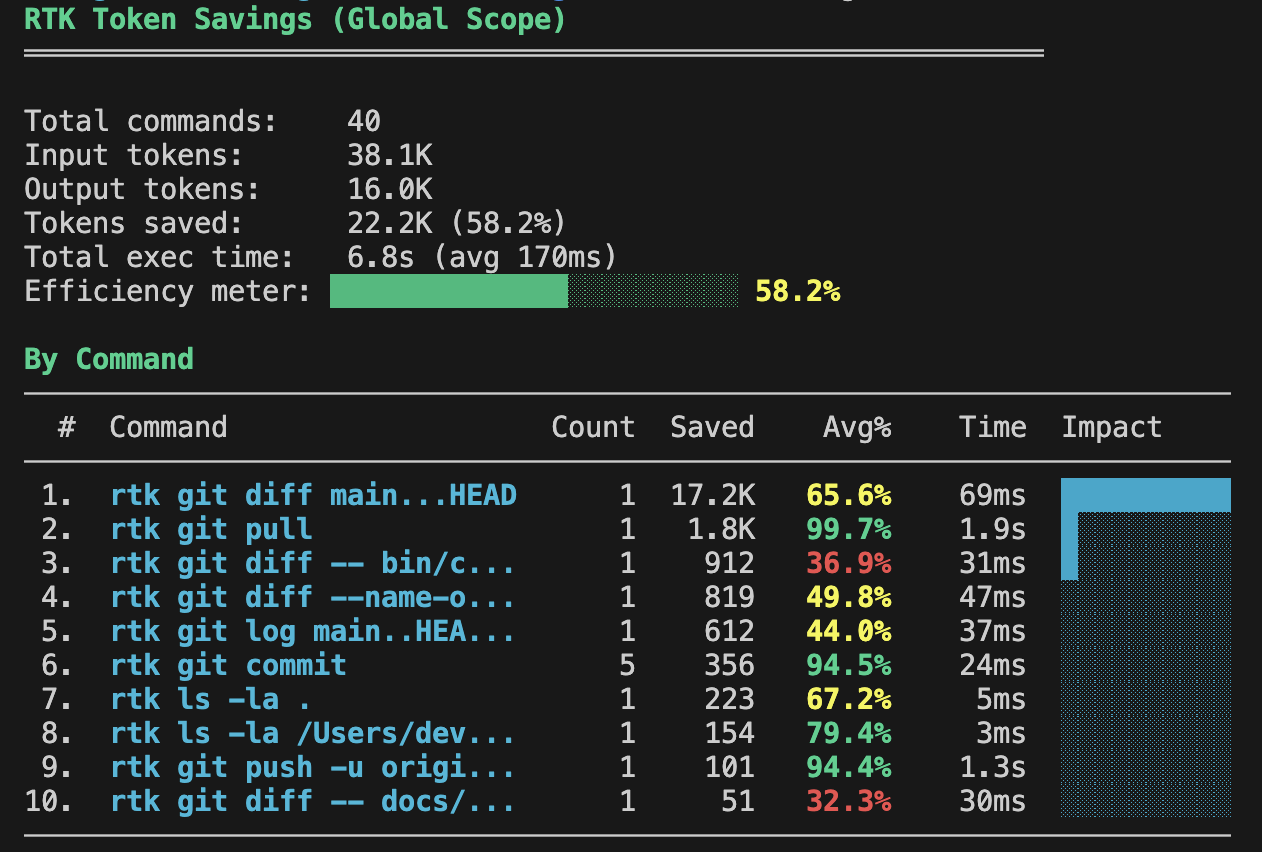
The savings can be significant. Here’s an example from my own usage:
How RTK works
Section titled “How RTK works”At a high level, RTK sits between the AI coding tool and your shell command:
Without RTK:AI tool -> shell command -> raw output -> AI context
With RTK:AI tool -> RTK -> shell command -> filtered output -> AI context
The agent still asks for the same kind of operation, but the result is compressed before it reaches the context window.
RTK can be used explicitly:
rtk git statusrtk git diffrtk test npm testrtk grep "MyWidget" .It can also be initialized for supported AI coding tools so commands are rewritten automatically where the tool supports hooks or plugins.
Install RTK for each AI tool
Section titled “Install RTK for each AI tool”Like ACT, RTK needs to be installed and configured for each AI coding tool you use.
First install the rtk binary. The RTK README recommends Homebrew on macOS:
brew install rtkThen initialize the integration for your coding tool:
rtk init -g # Claude Code / GitHub Copilot defaultrtk init -g --codex # Codexrtk init -g --agent cursor # Cursorrtk init -g --gemini # Gemini CLIrtk init -g --opencode # OpenCodeAfter initialization, restart the AI coding tool so the hook, plugin, or instruction changes are loaded.
The exact integration behavior depends on the tool. Some tools support automatic shell command rewriting. Others rely on instructions or project rules that tell the agent to call rtk explicitly. Check the RTK README for the latest supported agents and setup commands.
Measure RTK savings
Section titled “Measure RTK savings”RTK includes analytics for checking how much token usage it has reduced.
Run:
rtk gainFor more detail, RTK also supports options such as:
rtk gain --graphrtk gain --historyrtk gain --dailyUse this after a few coding sessions to see whether RTK is saving meaningful context for your workflow.
Monitoring token usage
Section titled “Monitoring token usage”ccusage is a family of CLI tools for monitoring token usage across different AI coding tools.
It does not reduce token usage directly. Its value is visibility: it helps you see usage patterns, costs, and model breakdowns so you can notice when sessions are getting expensive or when a workflow is consuming more tokens than expected.
Use the package that matches your coding tool:
npx ccusage@latest # Claude Code usage trackingnpx @ccusage/codex@latest # OpenAI Codex usage trackingnpx @ccusage/opencode@latest # OpenCode usage trackingRecommended workflow
Section titled “Recommended workflow”- Remove the obvious token sinks first so the agent receives less irrelevant context.
- Install RTK for each AI coding tool you use.
- Run your normal ACT workflow.
- Use
rtk gainto check the savings after real sessions. - Use ccusage when you want broader usage and cost visibility.
Related
Section titled “Related”- Context Management - understand how ACT keeps agent context focused
- Knowledge Loading - load the right amount of Flutter guidance for the task
- Choosing the Right Model - balance model quality, reasoning level, and cost