
Claude Code vs OpenCode
ACT supports both Claude Code and OpenCode. The skill names are the same, but the way you discover and run them differs.
Quick comparison
Section titled “Quick comparison”| Topic | Claude Code | OpenCode |
|---|---|---|
| Workflow skill invocation | Direct, e.g. /act-workflow-plan | Use /skills to discover and run the same act-* skills |
| Commands | Hyphenated ACT commands work as documented | Hyphenated ACT commands work as documented |
| Permission persistence | Interactive approvals can persist to .claude/settings.json | ”Always Allow” is session-only; persist rules in opencode.json |
| Hooks integration | Claude hooks in ~/.claude/settings.json | OpenCode plugin installed under ~/.config/opencode/plugins/ |
| ACT statusline | Supported | Not supported |
| DSP / YOLO mode | Supported | Not currently supported |
Skills on each CLI
Section titled “Skills on each CLI”Claude Code
Section titled “Claude Code”Invoke ACT skills directly by name:
/act-workflow-spec "add a settings screen"/act-workflow-plan ai_specs/settings-spec.md/act-git-push-make-prThis is the most direct ACT experience. The docs use this syntax as the canonical skill name.
OpenCode
Section titled “OpenCode”OpenCode uses the same installed act-* skills, but the normal entrypoint is the /skills UI:
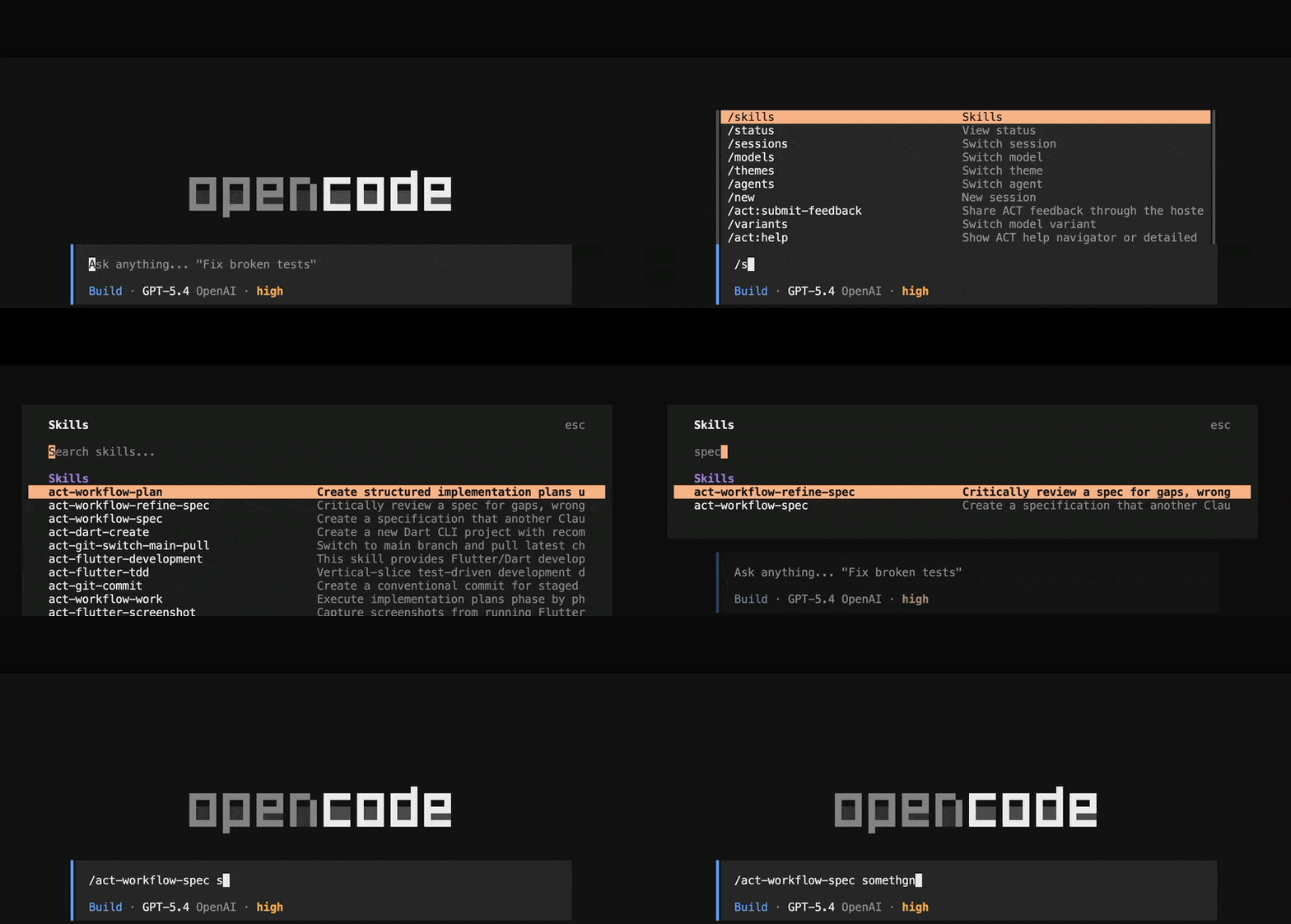
Use /skills to:
- browse available ACT skills
- select the matching
act-*skill - run it with the right arguments
The underlying skill names are still the same ones documented on this site, such as act-workflow-plan and act-git-push-make-pr.
Commands that remain command-based
Section titled “Commands that remain command-based”These remain documented as commands on both CLIs:
/act-help/act-update/act-update-changelog
Use /act-flutter-development for direct Flutter knowledge loading on both CLIs.
Permissions
Section titled “Permissions”The biggest day-to-day difference is permission persistence.
Claude Code
Section titled “Claude Code”- Interactive approvals can be written into
.claude/settings.json - Project-level settings can override global settings
- DSP mode is available if you deliberately choose that workflow
OpenCode
Section titled “OpenCode”- Session approvals do not persist automatically
- Persist ACT-friendly permissions in
opencode.json - DSP / YOLO mode is not currently available
For the full permission setup, see Permissions & Safety.
Hooks and runtime integration
Section titled “Hooks and runtime integration”Claude Code
Section titled “Claude Code”ACT installs Claude-compatible hooks through Claude’s settings system. That includes ACT’s hook automation and statusline support.
OpenCode
Section titled “OpenCode”ACT installs an OpenCode plugin under the OpenCode config directory. The plugin covers ACT’s hook-style behavior, but statusline parity is intentionally out of scope.
Which one should you use?
Section titled “Which one should you use?”- Choose Claude Code if you want the smoothest direct-skill workflow and optional DSP mode
- Choose OpenCode if you prefer its broader model/runtime ecosystem and are comfortable using
/skillsplus explicit permission config
Both CLIs support the same ACT concepts:
- spec -> plan -> work workflow
- git automation
- Flutter guidance skills
- docs, plans, and reusable artifacts in your repo
Windows and WSL
Section titled “Windows and WSL”If you are on Windows, use WSL consistently for the full ACT workflow:
- clone ACT inside WSL
- run the installer inside WSL
- start Claude Code or OpenCode from that same WSL environment
Do not mix a WSL install with PowerShell, CMD, or Git Bash sessions.