
Project Setup
After installing ACT, set up your project for structured AI-assisted development.
The AI folders
Section titled “The AI folders”ACT uses three folders alongside your project code to keep AI context organized:
ai_specs/— structured planning and execution (specs and plans for ongoing work)ai_docs/— persistent project knowledge (living documentation that evolves with the project)ai_logs/— session logs for debugging (disabled by default)
You don’t need to create these manually — ACT commands create them on the fly as needed.
ai_specs/ — Structured planning and execution
Section titled “ai_specs/ — Structured planning and execution”This is where specs and plans live. Think of it as guardrails that keep AI agents on track during implementation.
The workflow is:
- Create a spec — outline requirements for a feature, bug fix, or refactor
- Generate a plan — feed the spec to the AI and iterate until satisfied
- Implement the plan — execute one phase at a time for easier review
- Verify — run tests and manual checks
ACT workflow commands read from and write to this directory:
ai_specs/feature-name.md— your initial idea or braindump about what you want to accomplishai_specs/feature-name-spec.md— specifications created by/act:workflow:specai_specs/feature-name-plan.md— plans created by/act:workflow:plan
In practice, it’s convenient to use a numeric prefix (e.g. 001-, 002-) when naming spec files. This keeps them sorted chronologically. Example:
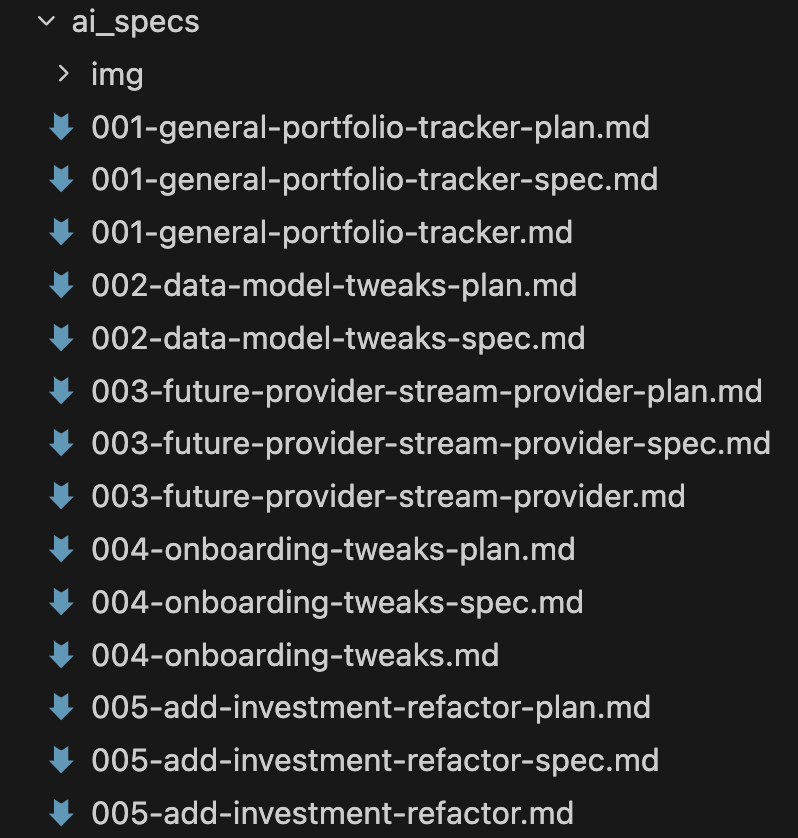
Over time, ai_specs/ becomes a historical record of all your prompts and plans — like a local copy of GitHub issues and PRs. Content may become outdated as the project evolves, but it remains a useful reference.
ai_docs/ — Persistent project knowledge
Section titled “ai_docs/ — Persistent project knowledge”A living knowledge base for AI agents — documentation that evolves with the project. This is where you put information the AI needs but can’t find directly in the code:
- API documentation and integrations
- Architecture and design documents
- Non-code business logic
- Project-specific patterns unique to your codebase
- Session insights captured by
/act:workflow:compound, organized by category (feature-delivery, bug-fixes, refactors, etc.)
The key distinction: ai_docs/ is living documentation you keep updated, while ai_specs/ is a historical task record that may go stale.
ai_logs/ — Session logs
Section titled “ai_logs/ — Session logs”Session logging is disabled by default. When enabled, the session logging hook tracks prompts and tool usage for each session. Useful for debugging and reviewing what happened during a session.
Project layout
Section titled “Project layout”You have two options for where to place the AI folders relative to your Flutter project.
Place your Flutter app inside a subfolder, with AI folders at the repo root:
my_repo/├── ai_docs/├── ai_specs/└── my_flutter_app/ ├── .dart_tool/ ├── android/ ├── ios/ ├── lib/ ├── test/ └── pubspec.yamlThis keeps the AI folders clearly visible and separate from your app code. It also works well for monorepo setups where you have multiple Flutter apps or packages in the same repo.
When using this layout, add one line to your CLAUDE.md so ACT knows where to find the app:
Flutter app folder: my_flutter_app/Place the AI folders directly alongside your Flutter project files:
my_flutter_app/├── .dart_tool/├── ai_docs/├── ai_specs/├── android/├── ios/├── lib/├── test/└── pubspec.yamlThis works well for simple single-app repos where you don’t need the extra separation.